
Feature: MCP Server
Building an MCP Server Using Only Notepad
Building an MCP Server Using Only Notepad
One day, a realization came to me.
Recently, there has been growing interest in MCP (Model Context Protocol), but seeing setups that require installing Node.js, Python, VS Code, and similar tools felt unnecessarily heavy. More importantly, this is not what our enterprise customers want.
So I asked myself: What if we could do this using only Notepad?
Yes! the default Notepad application that comes pre-installed on Windows.
It was time to verify whether it is possible to build an MCP server using nothing but Notepad.
Leveraging Built-in Programming Engines
As demonstrated by the WelsonJS framework, there are environments where the use of external development tools is severely restricted.
In such cases, projects rely on programming-capable engines already built into the operating system and maximize their use for software development.
Following this approach, we decided to implement a fully functional MCP server using only the built-in JavaScript engine provided by the OS, without any external tooling.
Understanding the MCP Protocol
The primary communication method supported by MCP clients (e.g., Claude Desktop) is:
- Standard Input/Output (stdio)
- JSON-RPC 2.0
In other words, an MCP server can be implemented by satisfying just two requirements:
- A stdio-based communication channel
- Compliance with the JSON-RPC 2.0 specification
Communication Flow
-
Request
MCP Client → Stdin (JSON-RPC 2.0 request) → MCP Server -
Response
MCP Client ← Stdout (JSON-RPC 2.0 response) ← MCP Server
Handling stdio Constraints
One important consideration is that stdio is often already used for console output (e.g., logs, debug messages).
To safely use stdio as a communication channel, it is essential to prevent such messages from corrupting the data stream.
In this implementation, the issue was resolved by introducing a quiet mode option (e.g., /quiet) to suppress auxiliary console output.
Implementing the MCP Server
Using the WelsonJS framework, we can build an MCP server with the pre-implemented:
StdioServerJsonRpc2
This example supports the following functions:
add_both_numbers— Adds two numbersevaluate_js_es3— Executes JavaScript (ES3 syntax)
Save the following file as mcploader.js:
// mcploader.js
// Copyright 2019-2026, Namhyeon Go <[email protected]> and the WelsonJS contributors.
// SPDX-License-Identifier: GPL-3.0-or-later
// https://github.com/gnh1201/welsonjs
//
var StdioServer = require("lib/stdio-server");
var JsonRpc2 = require("lib/jsonrpc2");

function main(args) {
    var server = StdioServer.create();

    server.addEventListener("message", function(e) {
        var message = e.target.receive();

        e.target.send(
            JsonRpc2.extract(message, function (method, params, id) {
                var isError = false;

                if (method == "initialize") {
                    return {
                        "protocolVersion": "2025-11-25",
                        "capabilities": {
                            "extensions": {
                                "io.modelcontextprotocol/ui": {
                                    "mimeTypes": ["text/html;profile=mcp-app"]
                                }
                            }
                        },
                        "serverInfo": {
                            "name": "WelsonJS MCP",
                            "version": "1.0.0"
                        },
                        "isError": isError
                    };
                }

                if (method === "notifications/initialized") {
                    return false;
                }

                if (method == "tools/list") {
                    return {
                        "tools": [
                            {
                                "name": "add_both_numbers",
                                "title": "add both_numbers (add A and B)",
                                "description": "add two numbers (add A and B)",
                                "inputSchema": {
                                    "type": "object",
                                    "properties": {
                                        "a": { "type": "number" },
                                        "b": { "type": "number" }
                                    },
                                    "required": ["a", "b"]
                                }
                            },
                            {
                                "name": "evaluate_js_es3",
                                "title": "Evaluate JavaScript ES3",
                                "description": "Evaluate JavaScript with ES3 syntax (use ES3 syntax strictly)",
                                "inputSchema": {
                                    "type": "object",
                                    "properties": {
                                        "script": { "type": "string" }
                                    },
                                    "required": ["script"]
                                }
                            }
                        ],
                        "isError": isError
                    };
                }

                if (method == "tools/call") {
                    var function_calling_name = params.name;

                    if (function_calling_name == "add_both_numbers") {
                        return {
                            "content": [
                                {
                                    "type": "text",
                                    "text": "Result is " + (parseFloat(params.arguments.a) + parseFloat(params.arguments.b))
                                }
                            ],
                            "isError": isError
                        };
                    }

                    if (function_calling_name == "evaluate_js_es3") {
                        return {
                            "content": [
                                {
                                    "type": "text",
                                    "text": (function(script) {
                                        try {
                                            return String(eval(script));
                                        } catch (e) {
                                            return "Error";
                                            isError = true;
                                        }
                                    })(params.arguments.script)
                                }
                            ]
                        }
                    }
                }

                isError = true;
                return { "isError": isError };
            })
        );
    });

    server.listen();
}

exports.main = main;
Registering the MCP Server in Claude Desktop
Add the following configuration to claude_desktop_config.json:
{
  "mcpServers": {
    "local-tools": {
      "command": "C:/Windows/SysWOW64/cscript",
      "args": [
        "/nologo",
        "YOUR_INSTALLATION_PATH/welsonjs/app.js",
        "mcploader",
        "/quiet"
      ]
    }
  }
}
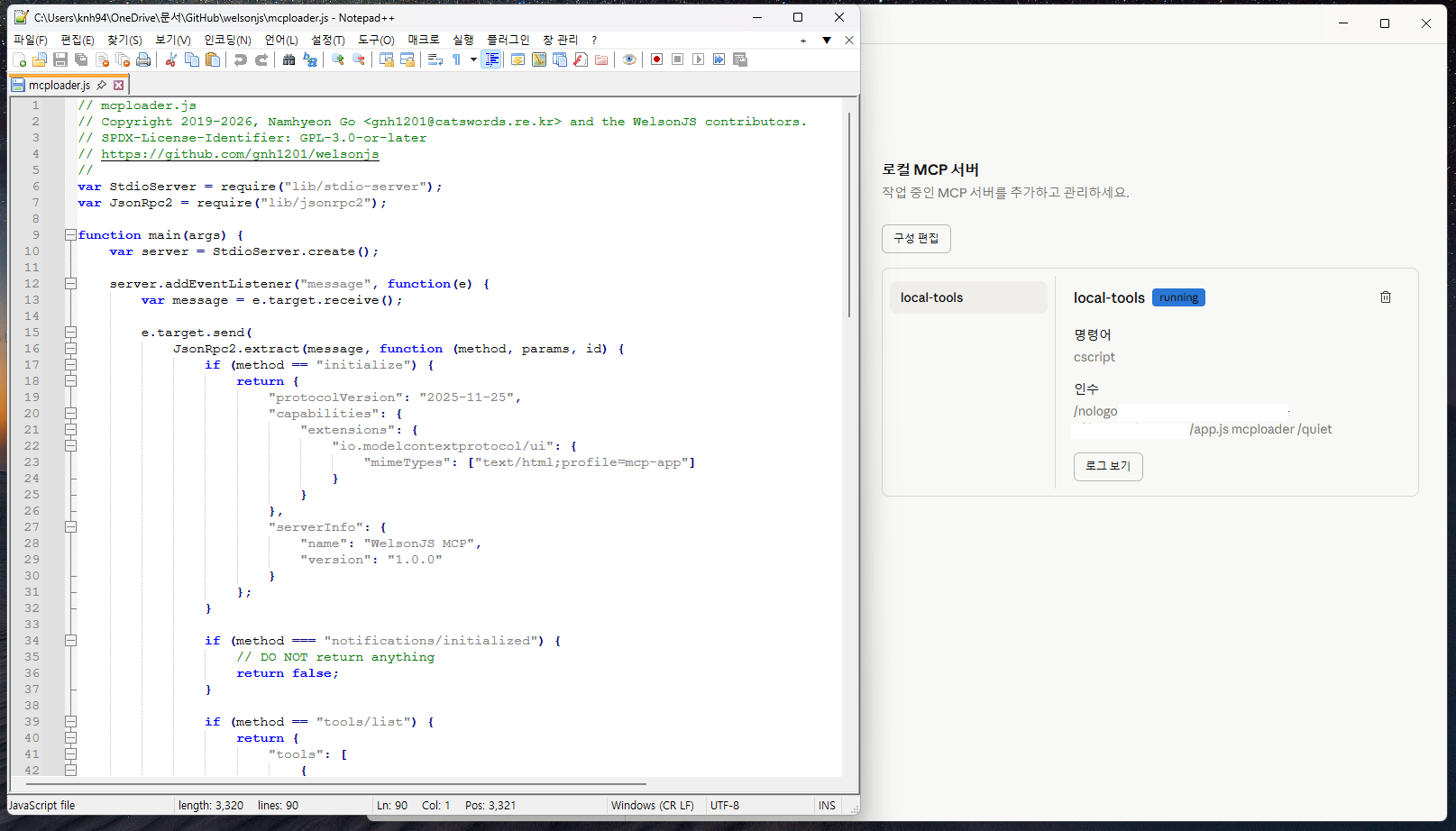
After restarting Claude Desktop, verify that local-tools is running via the Developer Settings menu.
Testing the MCP Server
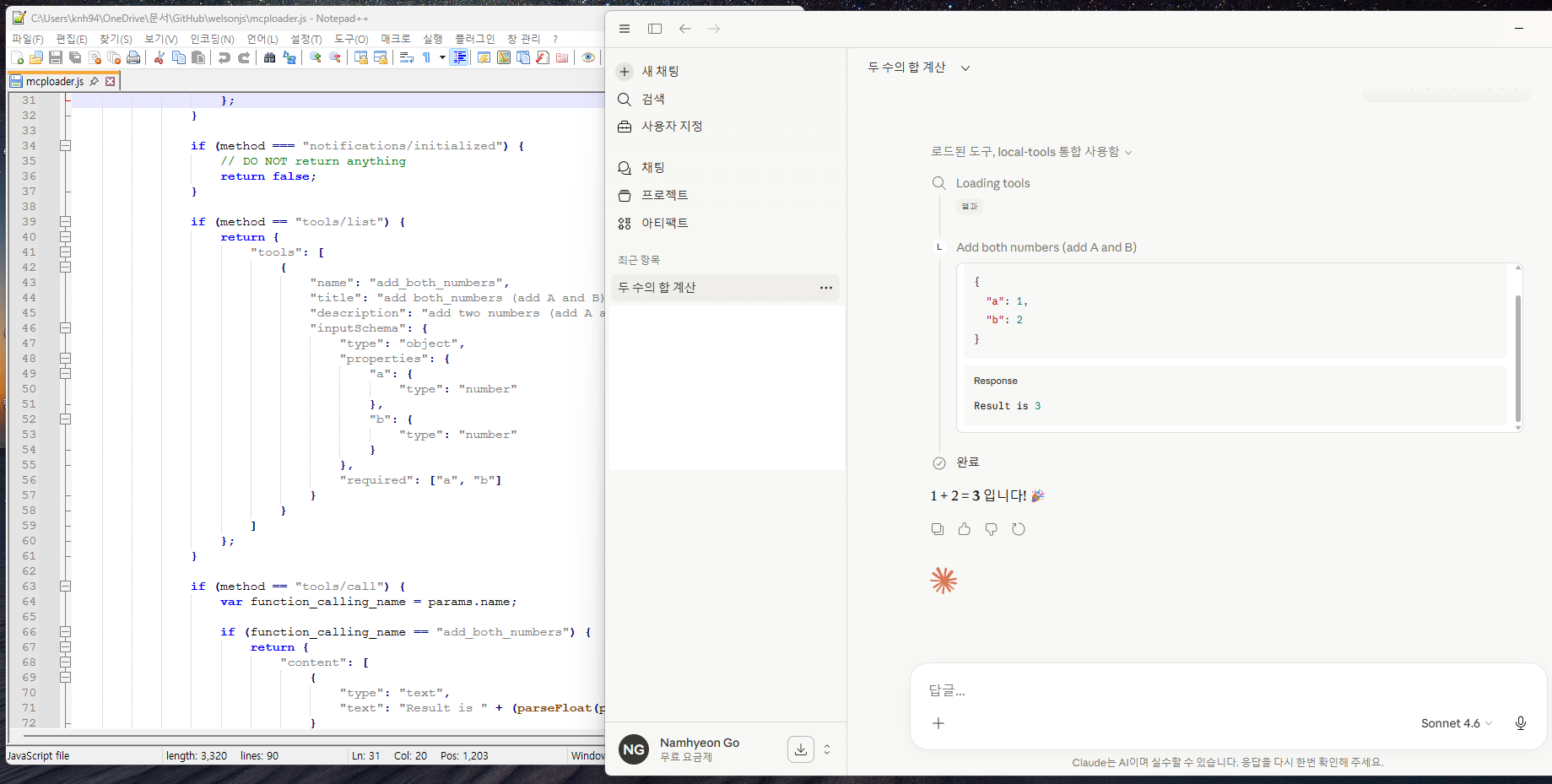
You can now test the server directly from the Claude Desktop chat interface:
- Request: “Add two numbers” → invokes
add_both_numbers - Request: “Run a JavaScript ES3 example” → invokes
evaluate_js_es3
The corresponding results will be returned via the MCP server.
Screenshots
Although Notepad++, a more advanced alternative to Windows Notepad, was used in the screenshot, the built in Windows Notepad alone is fully sufficient for practical use. 😆
Updated 6 months ago